 Deutsch
 English
 Español
Automate business processes with AI: 7 examples for small businesses
Which workflows are suitable, when clear rules are enough and how to assess effort, costs and benefits.

Contents
- What does business process automation mean?
- Seven practical examples for small businesses
- Which workflow matches your bottleneck?
- A real example: reminders in my own CRM
- Which process should you start with?
- Assess effort, costs and benefits realistically
- From a suitable workflow to a verifiable result
- Frequently asked questions about process automation
- Which recurring workflow costs you unnecessary time every week?
A customer enquiry arrives by email. You copy the contact details into your CRM, find earlier documents, create a task and note when to follow up. Soon afterwards, the same sequence starts again. These small repetitions take time and attention even though much of the work follows a familiar pattern.
If you want to automate business processes, start with a recurring workflow that has a recognisable outcome. Clear rules and connected systems can handle routine steps; AI can help interpret and organise free-form text. The following seven examples show how to choose a suitable starting point, what people still need to check and how to recognise an improvement.
What does business process automation mean?
Automation connects a trigger to agreed steps. When a complete form arrives, a rule can create a case, assign it to the right person and set a handling deadline. An integration transfers the required data between applications, for example from the form into your customer relationship management system, or CRM.
AI becomes relevant when the input is less predictable: a message written in free text could be classified by topic or summarised to prepare a reply. Test whether this assistance is sufficiently reliable using your own examples. Missing information or uncertain classifications need a defined route to a person. Responsibilities, exceptions and approvals therefore belong in the workflow from the beginning.
Seven practical examples for small businesses
The following workflows are general application examples. They describe possible solutions, not promised features of a particular product or measured customer results. Choose the example that most closely resembles your working day.
1. Capture and assign customer enquiries
When enquiries arrive in several inboxes, the same details get entered again and responsibility can remain unclear. You need the original message, contact information, the customer's request and rules defining who handles each topic. A known customer identifier helps connect the enquiry to the correct record.
A useful workflow creates the case once, checks required fields and assigns a task to the responsible person. An integration can transfer structured form data. For free-form emails, AI could suggest the topic and highlight relevant information. Ambiguous assignments and possible duplicates go to a person for review; binding replies need an appropriate approval step.
How to measure the benefit: Compare the time from receipt to correct assignment, subsequent corrections and enquiries without an owner. Faster entry helps only if the case can actually be handled afterwards.
2. Prepare and follow up on quotes
Each quote requires customer details, service descriptions and prices to be collected. Later, it may be unclear whether anyone has followed up. Start with a sufficiently complete enquiry, approved service descriptions, current pricing data and a clear quote status.
Rules can assemble suitable components, flag missing details and create a follow-up task after sending. AI could prepare a clear introduction or summary; prices and calculations come from the authoritative data. A responsible person approves the scope, terms and sending. Recording a completed sale or a rejection ends the follow-up sequence.
How to measure the benefit: Track preparation time, required corrections and open quotes without a next step. For a more developed sales workflow, the article on funnel CRM and structured follow-up explains how presentations, contact history and appointment booking can work together.
3. Organise deadlines and recurring tasks
Contract renewals, regular checks and recurring obligations live in spreadsheets or in individual people's heads. A system needs a reliable date, a recurrence rule, an owner and an unambiguous completion status. Cover arrangements and changed dates also need to be considered.
A rule-based workflow can create tasks in advance, remind people about open items and calculate the next date after completion is confirmed. Known date rules do not require AI. Suggesting a deadline from a document would be a separate AI use case requiring review. A person confirms completion and decides how to handle exceptions.
How to measure the benefit: Look at overdue tasks, time spent checking lists and incorrect reminders. In particular, check that completed items reliably disappear from the reminder list. A large number of notifications does not, by itself, show an improvement.
4. Preprocess incoming documents
Documents need to be opened, named, stored and linked to a customer or project. A suitable workflow needs the original file, accepted document types, required data fields and a clear filing structure. For scans, text recognition can first produce machine-readable text.
Fixed rules check file formats and required fields. AI could classify varied documents or suggest extracted information such as a reference number and date. The process preserves a link to the original passage so that details can be checked. Illegible pages, conflicting values and unclear assignments are set aside for review. Professional approvals or binding accounting entries remain a separate, controlled step.
How to measure the benefit: Count correctly preprocessed documents, manual corrections and follow-up questions; also measure handling time including review. A high number of processed files means little if every detail then has to be found again.
5. Make customer projects and approvals clearer
A draft is buried in an email thread, feedback is in a chat and nobody is certain which version was approved. The foundation is a project identifier, clearly named versions, responsible people and defined statuses such as “under review” or “approved”.
When a draft is ready for review, the system can create an approval task with a deadline and assign it to the responsible person. Rules prevent an older version from appearing as the current approval. AI could summarise lengthy feedback for the next editing step; the original remains available. An authorised person explicitly makes the approval decision. Silence is not treated as consent.
How to measure the benefit: Track search time, questions about status, waiting time for approvals and rework caused by incorrect versions. The goal is a clear next step for everyone involved.
6. Reduce duplicate data entry between systems
A new address is updated in the CRM but remains wrong in the quoting application. Before connecting systems, establish which application is authoritative for each field. You need stable customer identifiers, a field mapping and rules for conflicting changes.
An integration can transfer confirmed updates to the other system and make failed transfers visible. Retrying must not create a second customer or order. Fixed rules are sufficient for unambiguous data transfers. AI might help with inconsistent legacy data; merging records with uncertain identities should remain a proposal that can be reviewed.
How to measure the benefit: Compare time spent on repeated entry, inconsistent records and unresolved transfer errors. Less typing is valuable as long as mistakes are not simply spread across applications more quickly. Decide who resolves conflicts before the workflow goes live.
7. Prepare internal status reports
Before each team meeting, project updates, open quotes and due tasks are collected from different views. The foundation is maintained status data, a common reporting time and clear definitions: when is an item considered open, complete or overdue?
Integrations can collect the approved data; fixed queries calculate the figures. AI could turn them into a short draft report and flag unusual points for review. Each statement should be traceable to the underlying records. Missing data must remain visible. A responsible person checks the report and adds causes or decisions that cannot be established from the data alone.
How to measure the benefit: Measure preparation time, necessary corrections and unresolved status information. A fluently written report is useful only when the figures, reporting period and open questions are correct.
Which workflow matches your bottleneck?
| Workflow | Technical focus | Main source of effort |
|---|---|---|
| Enquiries | Data transfer and assignment; optional AI | Multiple channels and ambiguous requests |
| Quotes | Components, rules and follow-up tasks | Custom services and pricing logic |
| Deadlines | Date rules and confirmations | Exceptions and changing responsibilities |
| Documents | Text recognition, extraction and review | Varied formats and scan quality |
| Projects | Status, versions and approvals | Multiple participants and approval stages |
| Data entry | Integrations and field mapping | Duplicates and conflicting master data |
| Status reports | Queries; optional AI draft | Incomplete data and unclear definitions |
A real example: reminders in my own CRM
My CRM grew out of a specific problem: information was recorded in Excel, but different due dates still required regular checking. I designed and developed the system myself and use it in everyday work. It brings together recurring costs, tasks, domains and deadlines in one overview. The CRM reference with approved screenshots presents the application.
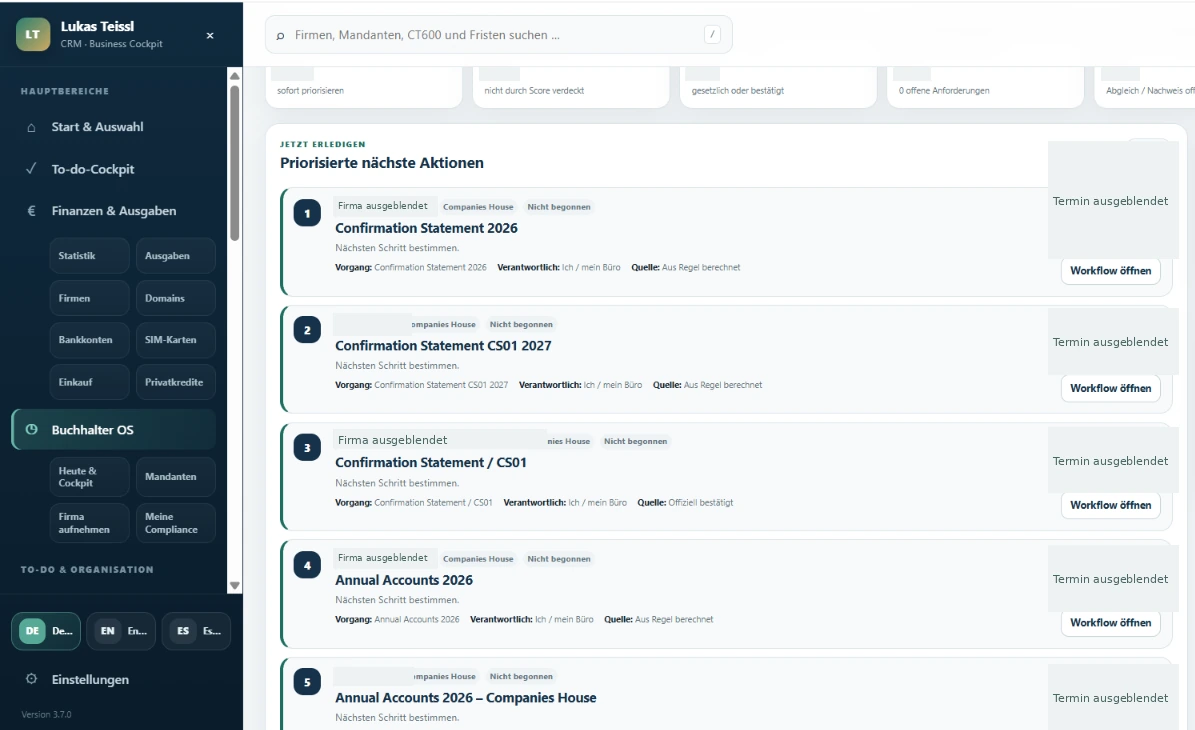
For outstanding payments, I receive email reminders three days before the due date, one day before, on the due date and then daily until confirmation. I deliberately record a payment as paid. That ends the reminder sequence for the item. This is a rule-based reminder; it does not describe automatic execution of payments.
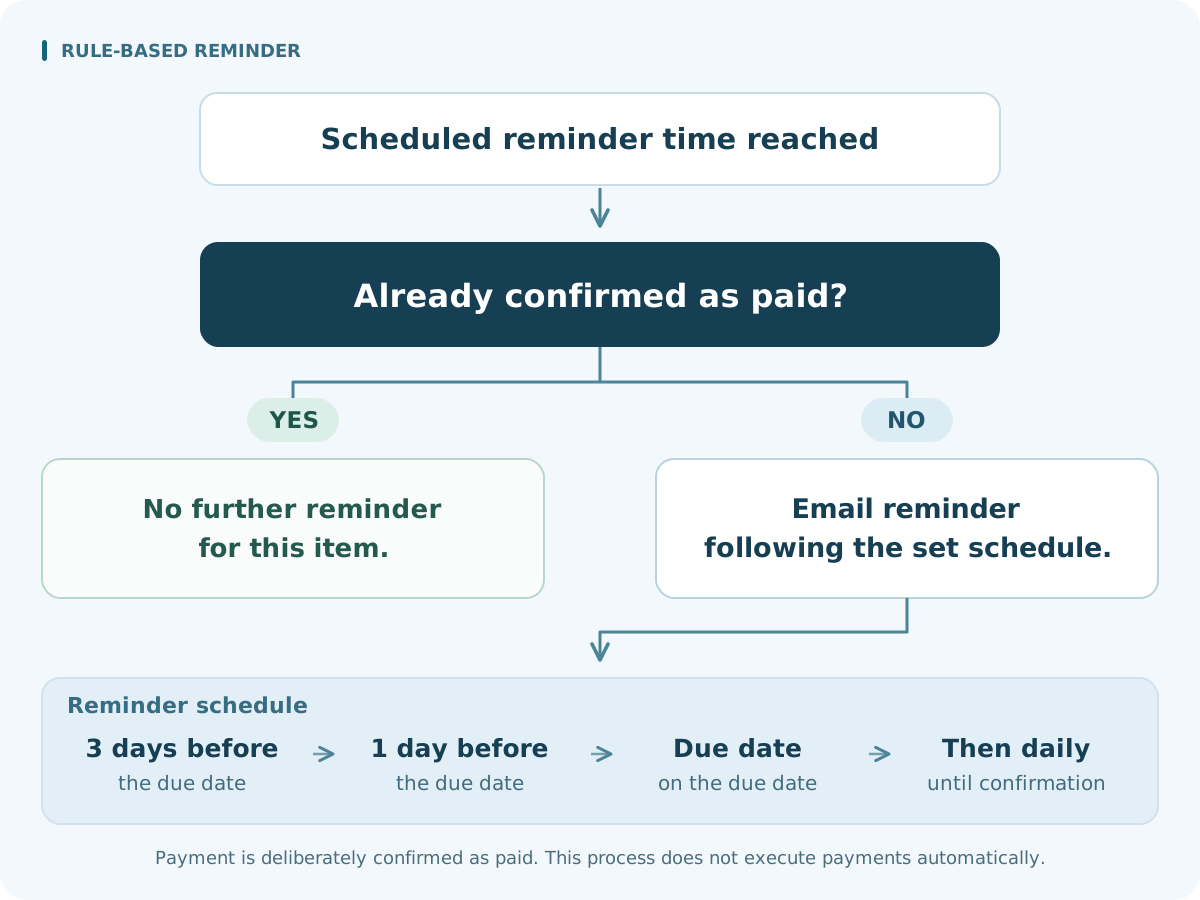
Scheduled reminder time reached
Already confirmed as paid?
Yes No further reminder for this item.
No Send a reminder according to the defined schedule.
Schedule Three days before, one day before, on the due date, then daily until confirmation.
My practical experience is a clearer view of open items and less mental effort keeping track. The CRM case study describes that personal benefit. Its reference to 80 per cent is a planning target for suitable routine tasks, not a measured time saving from this CRM. If you want to bring similar tasks together, the Lukas Teissl Compass can help you clarify your starting point.
Which process should you start with?
Choose a workflow that occurs often enough and whose current effort is visible. Define its start and finish: for example, “from receipt of an enquiry to a complete, correctly assigned case”. Name the responsible person and the desired outcome. “Automate our administration” is still too broad.
Then examine the data. Is the required information available and reliable? Which cases regularly deviate from the normal route? What happens if an item is assigned incorrectly or a check is missed? A manageable standard case with a clear route back to a person is a better starting point than a workflow full of unresolved exceptional decisions.
Include the remaining review effort and the ability to measure results. If checking takes as long as the original work, the approach is not yet convincing. I recommend comparing two or three concrete candidates using real cases. Choose the one with the best combination of expected benefit, data quality and manageable exceptions. You do not need a points-based score.
Assess effort, costs and benefits realistically
The cost of AI automation goes beyond a software licence. Initial work includes process analysis, setup, data preparation, integrations and training. Recurring costs may include software fees, usage-based API charges, operation, monitoring and maintenance. An API is the technical interface through which applications use a service's functions. Human review and subsequent changes also belong in the calculation.
Measure complete handling paths, including follow-up questions and rework. Separate the initial investment from recurring effort and check whether the benefit remains plausible with fewer cases. The guide to choosing an AI expert and assessing value, delivery and quality explores provider evaluation and project scope in more detail.
From a suitable workflow to a verifiable result
- Record the starting point: Document a typical case and relevant exceptions. Measure frequency, handling time, follow-up questions and open items.
- Define a limited objective: Specify the result that the first implementation should deliver and which decision a person will continue to make.
- Try suitable sample data: Use data you are authorised to process, avoiding unnecessary personal information where possible. Include incomplete and duplicate inputs.
- Review results and exceptions: Compare them with the agreed requirements. Also check what happens when data is missing or a connection is interrupted.
- Assign operational responsibility: Decide who handles errors, manages access and checks changes. Keep a route to manual handling available.
The results will show whether the workflow should be expanded. For analysis and technical implementation, IT consulting and business optimisation explains the scope of my services. Your existing tools and actual working process determine the appropriate solution.
Frequently asked questions about process automation
Is automation worthwhile for a small business?
Yes, if a recurring task creates enough work and the remaining operational effort stays manageable. For infrequent cases, a better template or clearer responsibility may be the more useful first step. Your workflow matters more than company size alone.
Which processes are suitable for a first project?
Frequent, clearly bounded workflows with reliable data and a visible outcome. An internal follow-up task or the transfer of complete form data can be a good candidate. Examine exceptions and necessary checks first.
When does AI help, and when are fixed rules enough?
Fixed rules suit known conditions, date calculations and unambiguous data transfers. AI can structure free-form text or prepare drafts. Use it where a test with your own data demonstrates a clear benefit.
Can existing software still be used?
That depends on its functions, export options and integrations. First check existing automation features and permissions. A targeted connection or extension may be sufficient; replacing everything is not a prerequisite.
What costs remain after setup?
Depending on the solution, there may be licences, API usage, hosting, maintenance and support. Add staff time for review, exceptions and changes. Agree on scope and responsibilities before implementation, then monitor actual operating costs.
Which recurring workflow costs you unnecessary time every week?
Write down the trigger, applications involved, current handling steps and desired result. Add a typical exception. You already have a clear basis for choosing your first process. The Compass can help you clarify your needs; in a personal conversation, we can discuss your specific workflow.
Sources & further information
- Lukas Teissl CRM – reference and approved original screenshotsLukas Günther Teissl · Accessed: November 16, 2026View original source
Evidence of the custom development, described work areas and approved anonymised CRM screenshot. The interface is original and was not generated for this article.
- CRM automation: my practical case studyLukas Günther Teissl · Accessed: November 16, 2026View original source
Evidence of the initial problem, personal development and use, and reminder sequence until deliberate payment confirmation. The reference to 80 per cent is a planning target, not a measured CRM result.
- About Lukas Günther TeisslLukas Günther Teissl · Accessed: November 16, 2026View original source
Official author profile and context for his work in IT, software development and business analysis.
Find a suitable starting point for your business
The Lukas Teissl Compass helps you clarify your needs and identify a useful next step. If you can already describe your workflow, we can discuss it personally.

Lukas Günther Teissl
Lukas Günther Teissl combines long-standing IT experience, system development and structured business analysis. The knowledge centre explains technical and strategic relationships clearly, practically and without unnecessary simplification.